FORUM RULES UPDATED - The forum rules have been updated to continue to provide a friendly and safe environment for our member community. Please take a moment to review the updated rules and our terms of use and privacy policy. Click here for Forum Rules which has links to the 'terms of use' and 'privacy policy'.
In Other News . . .
You will notice a few enchancements to the forums to make your experience better. These include: Email Notifications, Thread Previews, Thread Starter Notation, and Emoji Options on the 'Like' icon. . .
Additionally, the merchant portions of the website have been updated and are now operational. . . . Check out iBoats for all your boating gear.
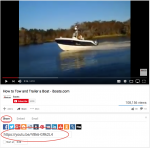
Here's a tutorial for linking / embedding videos in a topic thread. For the most part this is based on working from YouTube, but the same idea applies to any video streaming site.
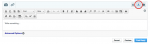
Start by typing your text into the editor, but make sure you turn on the "Advanced Editor" by clicking the underlined "A" in the upper right corner:
Then you want to click on the film strip icon:
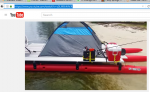
Another way is to right click, then Copy the URL highlighted in blue;
Go back to the message area and click the Insert Video, paste the Youtube URL and click OK followed by the Save button. Post the reply as you normally do.